SQE1 for staff
People and invitations
Add anyone, and decide when they hear from us.
Admins only. CLIP team → People is the only way anyone joins SQE1. There's no public sign-up.
Adding someone
Enter their name and email, and choose their role: Student, Faculty, Admin or Client.
For a student, choose their cohort. They go on both papers. For a client's contact, choose the client.
Press Add.
Adding doesn't tell them
Nobody hears from us when you add them. They show as Not invited until you invite them, and can't sign in until then.
Someone already on another CLIP programme keeps their login and gains SQE. They get the CGI | SQE switch, and each side shows only its own data.
Sending invitations
Tick the people you're ready to invite. Use the role filters at the top to find them.
Read the email at the bottom of the page. That's exactly what they'll get.
Press Send invitations to those ticked.
Each person gets a link to choose their own password. The link lasts 7 days. If it runs out, tick them and send it again.
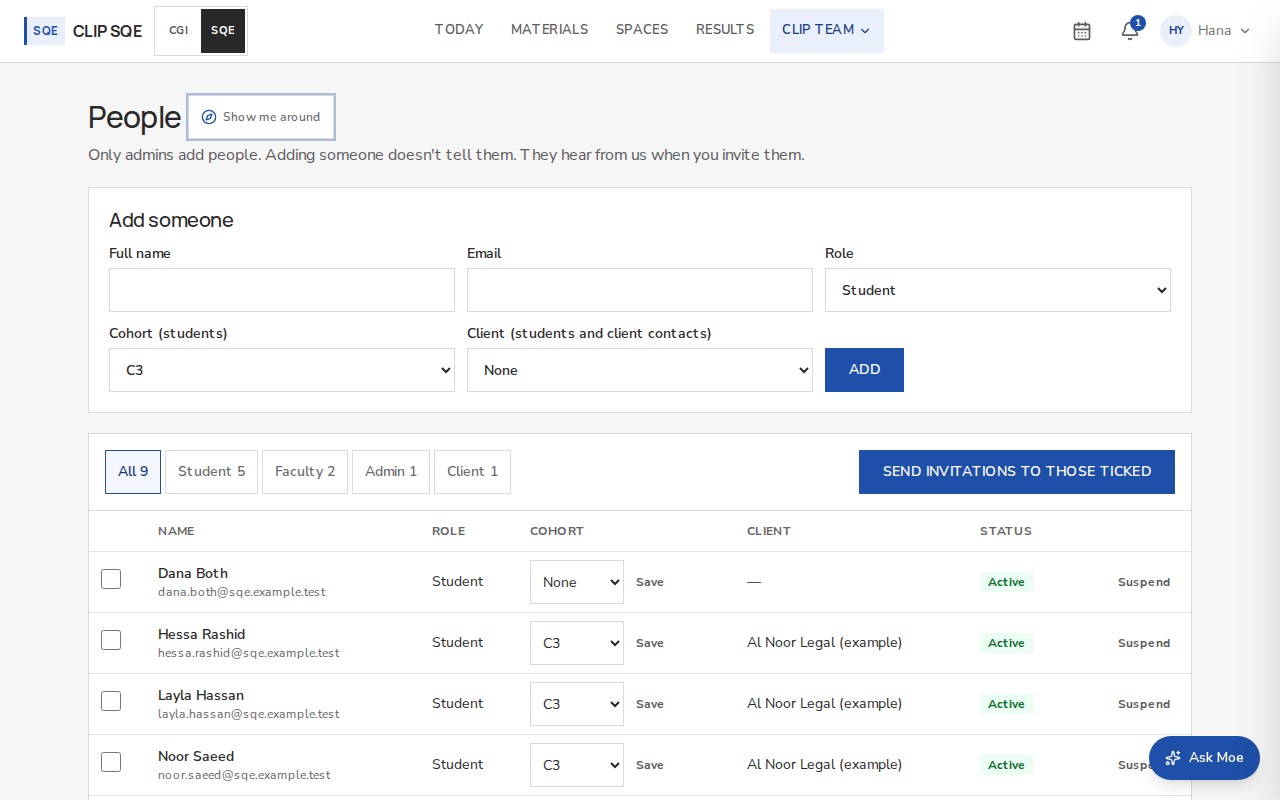
Invented people. Status shows where each person is.
| Status | Meaning |
|---|---|
| Not invited | Added, but hasn't heard from us. |
| Invited | The email has gone, and they haven't set a password yet. |
| Active | They've signed in. |
| Suspended | They can't sign in. Their work stays. Restore lets them back. |
If an email doesn't send, the page says so. Resend invite beside the person gives you a link to pass on yourself.